
Surface & Interface Hub
Theme
XPS dataset preparation
XPS Tools · v0.4

XPS VAMAS Dataset Builder

Prepare and organize XPS datasets stored in VAMAS format from single or multiple files. Review iterative acquisitions, exclude unwanted spectra, and build a clean multi-sample dataset for later XPS processing.

Launch VAMAS Dataset Builder → VAMAS files are processed locally in your browser.
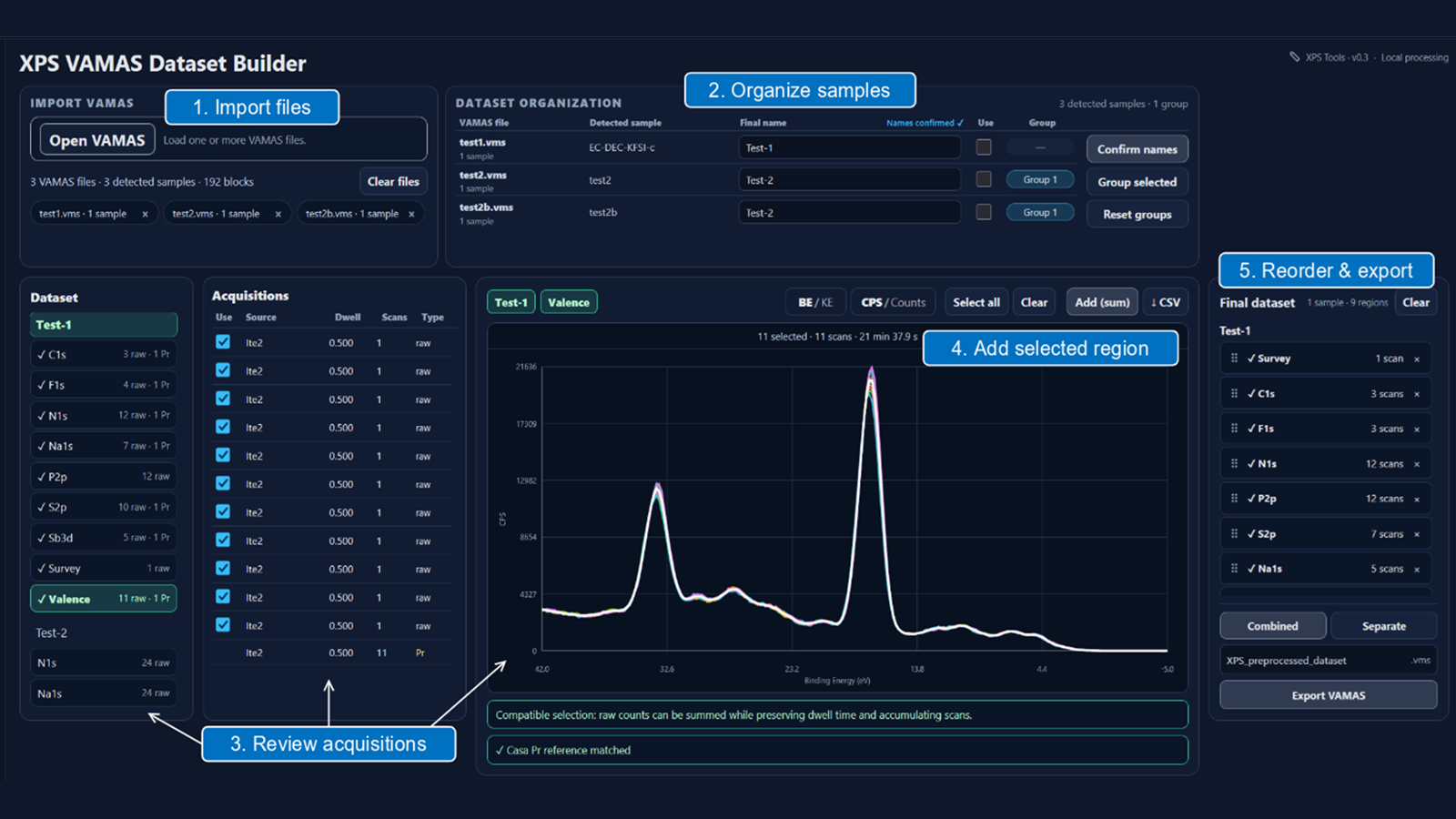
Annotated XPS VAMAS Dataset Builder interface showing import, sample organization, acquisition review, region validation and final export.
Example of iterative XPS acquisitions reviewed and assembled into a clean multi-sample VAMAS dataset.

From VAMAS files to final dataset

1. Import VAMAS files

Open one or more VAMAS files to begin.

2. Organize samples

Rename samples or group those that belong to the same final sample.

3. Review iterative acquisitions

Compare repeated spectra and exclude unwanted acquisitions.

4. Validate selected regions

Add a single acquisition or the sum of compatible repetitions to the final dataset.

5. Export the final dataset

Reorder core levels if needed, then export one combined VAMAS file or separate files for each sample.

The decision to retain or exclude an acquisition remains under user control.